
Generative AI for Code Review: Real‑Time Feedback in Your CI Pipeline
Learn how to embed LLM‑powered code review tools into your CI workflow, delivering instant feedback and catching bugs before they reach production.
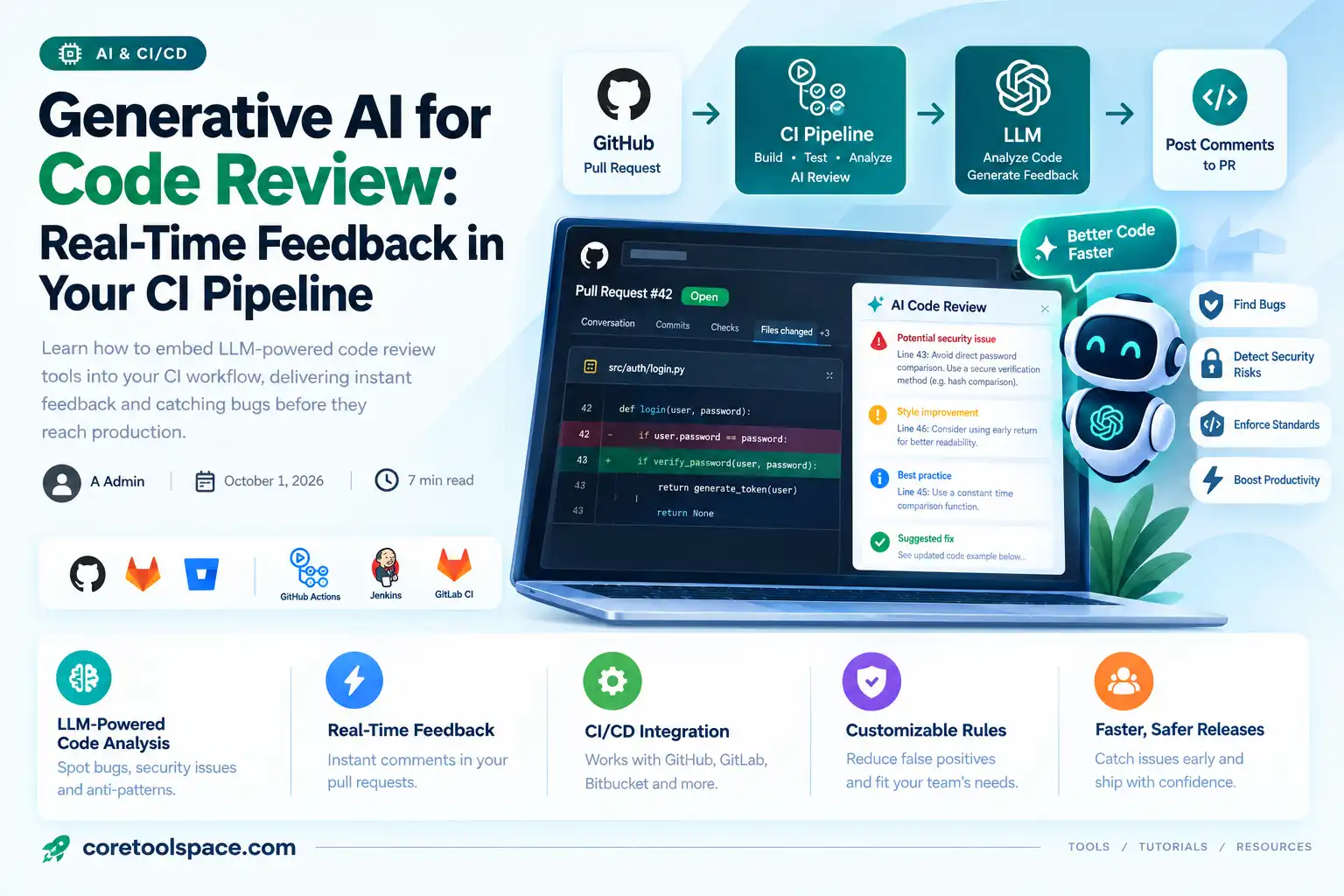
Imagine a pull request that receives detailed, line‑by‑line feedback the moment a developer pushes code, without waiting for a teammate to click "Review". That scenario is no longer a futuristic sketch; it is becoming the norm thanks to generative AI models that understand syntax, style, and intent. By weaving these models into continuous integration (CI) pipelines, teams can surface bugs, security concerns, and style violations as soon as code lands, turning the review process from a bottleneck into a catalyst for productivity.
Why Generative AI Is Changing Code Review
From Manual Checks to Instant Insight
Traditional code review relies on human expertise, which is invaluable but limited by availability, fatigue, and varying standards across a team. Generative AI, especially large‑language models (LLMs) trained on billions of lines of code, can provide consistent, context‑aware suggestions at scale. The models can spot common anti‑patterns, suggest more idiomatic constructs, and even flag potential security flaws that a quick glance might miss. Because the analysis happens automatically during the CI run, developers receive feedback before they merge, reducing the cycle time for fixing defects.
Core Components of an LLM‑Powered Review System
The LLM Engine
The heart of the system is an LLM that has been fine‑tuned for code. Options range from commercial offerings such as GitHub Copilot X to open‑source models accessible via APIs. The engine must support prompt‑based interaction, allowing the surrounding infrastructure to send snippets of code and receive structured feedback. Most providers expose a REST endpoint that accepts a JSON payload containing the file path, language, and diff, and returns suggestions in a predictable schema.
Prompt Engineering for Code Context
Effective prompting is essential. A well‑crafted prompt supplies the model with the necessary context—file name, language, and the exact diff—and asks for concise, actionable comments. For example:
{
  "model": "gpt‑4‑code",
  "messages": [
    {"role": "system", "content": "You are a senior software engineer reviewing Python code."},
    {"role": "user", "content": "Review the following diff and list any bugs, security issues, or style violations. Return each comment with line number and brief explanation."},
    {"role": "assistant", "content": ""}
  ]
}
This structure guides the model to stay on task and produce output that can be parsed directly into review comments.
Integration Layer (API, Webhook)
The integration layer translates CI events into API calls. When a CI job detects a new commit or a pull‑request update, it extracts the changed files, formats the prompt, and sends it to the LLM endpoint. The response is then mapped to the platform’s review API (GitHub, GitLab, Bitbucket) to post comments inline. This layer also handles rate limiting, retries, and authentication, ensuring a smooth experience even under heavy load.
Embedding AI Review into CI/CD Pipelines
Choosing the Right Hook
CI systems offer several entry points for code analysis. A pre‑commit hook runs locally before code is even pushed, providing immediate feedback but requiring developers to install additional tooling. A pre‑push hook runs on the developer’s machine just before the push reaches the remote, catching issues early while still keeping the CI server free of extra load. Most teams opt for a CI job that triggers on pull_request or push events, because it centralizes the analysis and guarantees that every contribution is examined regardless of the developer’s local setup.
Sample Workflow with GitHub Actions
The following snippet demonstrates a minimal GitHub Actions workflow that runs an AI reviewer on every pull request. It checks out the code, computes the diff, calls the LLM API, and posts comments back to the PR.
name: AI Code Review
on:
  pull_request:
    types: [opened, synchronize]
jobs:
  review:
    runs-on: ubuntu-latest
    steps:
      - uses: actions/checkout@v3
        with:
          fetch-depth: 0
      - name: Install diff tool
        run: sudo apt-get install -y diffutils
      - name: Generate diff
        id: diff
        run: |
          git diff origin/${{ github.base_ref }}...${{ github.head_ref }} > changes.diff
          echo "::set-output name=file::changes.diff"
      - name: Call AI reviewer
        env:
          AI_API_KEY: ${{ secrets.AI_API_KEY }}
        run: |
          curl -X POST https://api.example.com/review \
            -H "Authorization: Bearer $AI_API_KEY" \
            -F "diff=@${{ steps.diff.outputs.file }}" \
            -o review.json
      - name: Post comments
        uses: peter-evans/create-or-update-comment@v2
        with:
          token: ${{ secrets.GITHUB_TOKEN }}
          issue-number: ${{ github.event.pull_request.number }}
          body: |
            $(jq -r '.comments[] | "*Line \(.line): \(.message)*"' review.json)
This workflow is intentionally simple; production setups often include caching, parallel processing of multiple files, and richer formatting of the comments.
Handling False Positives and Configurable Rules
No AI model is perfect. To keep developer trust, it is crucial to allow teams to configure rule sets, suppress certain categories, or require a human approval step for high‑severity findings. Many platforms support a “review label” that can be applied to a PR to indicate that the AI feedback has been acknowledged. Additionally, storing the model’s raw output enables auditors to review the reasoning behind a suggestion, which is especially important for security‑related alerts.
Best Practices for Real‑Time Feedback
Balancing Speed and Accuracy
LLMs vary in latency based on model size and hosting environment. For real‑time CI feedback, choose a model that meets your latency budget—often a smaller, fine‑tuned variant provides sufficient accuracy with faster response times. You can also implement a two‑stage approach: a quick lint‑style pass runs instantly, while a deeper semantic analysis runs in a background job and updates the PR with additional comments later.
Securing Sensitive Code
Sending proprietary code to an external API raises security concerns. Mitigate risk by using self‑hosted models behind your firewall, or by encrypting the payload and ensuring the provider adheres to strict data‑handling policies. Many enterprises also configure the CI job to redact secrets before sending the diff, preventing accidental exposure of API keys or passwords.
Continuous Learning and Model Updates
As your codebase evolves, the AI reviewer should evolve with it. Periodically retrain or fine‑tune the model on your own repositories to capture project‑specific conventions. Some teams automate this process: after each release, a script extracts a representative sample of code, feeds it into a fine‑tuning pipeline, and deploys the updated model for the next CI cycle.
Future Outlook and Adoption Trends
Open‑Source LLM APIs and Community Tools
The recent surge in open‑source LLM APIs—such as those built on LLaMA, Mistral, or StarCoder—lowers the barrier to entry for teams that prefer on‑premise solutions. Community‑driven projects provide ready‑made adapters for popular CI systems, making it easier to experiment without committing to a commercial vendor. This democratization is accelerating adoption across startups and large enterprises alike.
The Role of Human Review
Even the most advanced model cannot replace the nuanced judgment of an experienced engineer. AI reviewers excel at catching repetitive mistakes, enforcing style guides, and surfacing low‑level bugs. Human reviewers, however, remain essential for architectural decisions, complex refactors, and assessing the broader impact of changes. The optimal workflow treats AI feedback as a first line of defense, freeing humans to focus on higher‑order concerns.
How do I prevent the AI reviewer from commenting on generated code in test files?
Configure the integration layer to filter out paths that match your test directory pattern (e.g., tests/**) before sending the diff to the LLM. Most CI tools allow you to specify include or exclude glob patterns, ensuring the model only analyzes production code.
Related posts
View allLeveraging GPT‑4 Turbo for Real‑Time Customer Support Automation
Discover a step‑by‑step guide to integrate OpenAI’s GPT‑4 Turbo into ticketing platforms, enabling fast, cost‑effective real‑time support while scaling smoothly as demand grows.
Building Multi‑Modal AI Assistants with OpenAI’s GPT‑4 Turbo: A Step‑by‑Step Guide
OpenAI’s GPT‑4 Turbo now supports images, enabling developers to craft multi‑modal AI assistants that boost productivity. Follow this practical guide to integrate vision, text, and tool use into your apps today.
Turbocharge Your Small Business with OpenAI’s GPT-4 Turbo API
Discover how small businesses can integrate OpenAI’s new GPT-4 Turbo API to automate routine tasks, cut costs, and boost productivity—step by step.
Comments (0)
Be the first to share feedback on this post.